

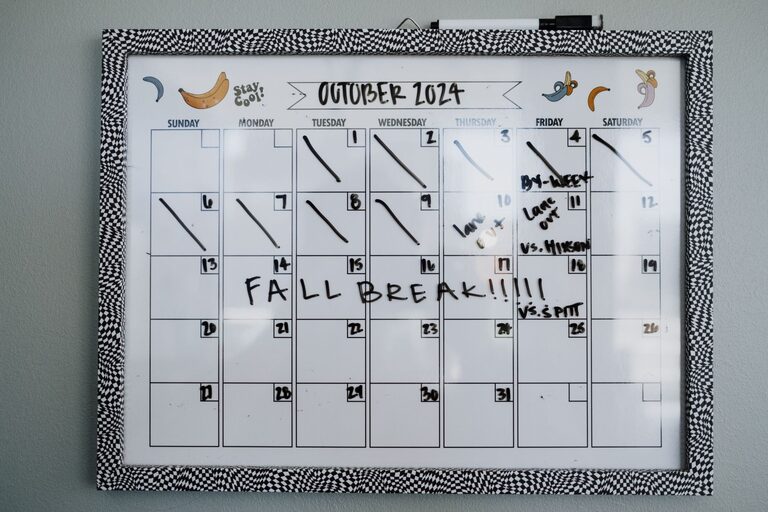
A family command center is a dedicated spot where everyone can find important information and everyday items. It can help reduce clutter, simplify busy mornings, and make household responsibilities easier to manage.
The best command center does not need to be large or expensive. A small section of a wall, a kitchen corner, or a cabinet can work well. The goal is to create a system that fits your family’s routines and is easy for everyone to use.
Choose the Right Location
Start by observing where your family naturally gathers and drops things. A command center works best in a high-traffic area, such as:
– Near the main entrance
– Beside the kitchen
– In a mudroom
– Along a hallway
– Near the garage entry
– In a home office or shared workspace
Choose a location that is easy to see and reach. If children will use the space, place important items at a height they can access safely.
Avoid choosing a spot that is hidden or difficult to reach. A beautiful system will not be useful if family members forget it exists. You should also consider lighting, wall space, and whether the area is exposed to moisture or heavy traffic.
Decide What Your Family Needs
Before buying supplies, make a list of the tasks your command center should support. Every household is different, so focus on the information and items your family uses regularly.
Your command center might include space for:
– A weekly or monthly calendar
– School schedules and activity information
– To do lists
– Mail and paperwork
– Keys and small essentials
– Lunch and meal planning
– Household reminders
– Chores and responsibilities
– Bags, jackets, or reusable shopping bags
Keep the system focused. If you try to include everything, the area may become crowded and difficult to maintain. Choose the features that solve your most common problems first.
Create Simple Zones
Divide the command center into clear zones. Each zone should have one purpose and an obvious place for related items.
Calendar Zone
A shared calendar provides a quick view of appointments, school events, activities, and other plans. You can use a paper calendar, a dry erase board, or a combination of a wall calendar and a digital calendar.
Use a consistent color for each family member if that makes the schedule easier to read. Keep the calendar updated at a regular time, such as Sunday evening or the first day of each month.
Include only important events that affect the household. A calendar that is packed with unnecessary details can be harder to understand.
Paperwork Zone
Paperwork often creates clutter because it does not have a clear destination. Add labeled folders, wall pockets, or a small filing box for common categories.
Useful labels may include:
– To review
– To sign
– To return
– School
– Activities
– Receipts
– Important information
Set a limit for each category. Once a folder is full, sort through it and recycle or file anything that is no longer needed. Avoid keeping sensitive documents in an open area where visitors can see them.
Key and Essentials Zone
A small hook rail, tray, or basket can keep frequently used items in one place. Consider adding designated spaces for:
– House keys
– Car keys
– Sunglasses
– Wallets
– Access cards
– Reusable bags
– Pet walking supplies
Assign each family member a specific hook or container. Clear labels or simple names can help children remember where their items belong.
Meal Planning Zone
If meal planning is a regular challenge, include a small space for the weekly menu and grocery reminders. A magnetic notepad, dry erase board, or clipboard can work well.
You might divide the area into sections for:
– This week’s meals
– Grocery items
– Items to use soon
– Lunch ideas
Keep the menu practical. It is fine to include leftovers, simple meals, and flexible options for busy days.
Responsibility Zone
A chore or responsibility chart can help everyone understand what needs to be done. Make the system age appropriate and easy to update.
You can list tasks by:
– Person
– Day
– Room
– Frequency
Use checkboxes, magnets, or reusable cards instead of creating a new chart every week. Keep the focus on shared responsibilities rather than making the display complicated.
Select Supplies That Match Your Space
You do not need a complete matching set. Combine useful items based on the available space and your budget.
Common supplies include:
– A wall calendar
– Dry erase boards
– Corkboards
– Clipboards
– File folders
– Wall pockets
– Hooks
– Baskets
– Trays
– Labels
– Pens and dry erase markers
– Magnetic clips
Choose durable materials that are easy to clean. If you use a dry erase surface, test the markers before installing it. For paper storage, select folders that can hold documents without bending or overflowing.
Small homes may benefit from vertical storage. A narrow wall organizer, pegboard, or door-mounted system can provide several functions without taking up floor space.
Make the System Easy to Use
A command center should reduce effort, not create extra work. Place frequently used items in the easiest-to-reach locations. Use simple labels and keep instructions brief.
For example, a paperwork area might have three folders labeled “Act,” “File,” and “Recycle.” These labels are easier to follow than a long list of categories.
Consider using a combination of visible and hidden storage. Calendars and weekly plans should be easy to see, while extra supplies and private documents can stay in drawers or closed cabinets.
If young children use the command center, use pictures or color coding along with written labels. This can make the system more accessible and encourage independent habits.
Set a Maintenance Routine
Even a well-designed command center needs regular attention. Choose a short weekly reset time when everyone can help.
During the reset:
- Review the upcoming week.
- Remove outdated papers and notices.
- Update appointments and activities.
- Return misplaced items to their assigned spots.
- Check the grocery list and meal plan.
- Restock pens, paper, or other supplies.
- Clear empty folders and overflowing baskets.
A five- to ten-minute reset is often enough to keep the area useful. You can also do a larger monthly review for old paperwork, seasonal activities, and rarely used items.
Avoid Common Setup Mistakes
A few simple guidelines can make your command center more successful.
Do not overcrowd the space. Leave room for new papers and changing schedules.
Do not create too many categories. A few clear sections are easier to maintain than many narrow ones.
Do not rely on memory. If something is important, place it on the calendar, in a folder, or on a visible list.
Do not ignore household feedback. Ask family members what is working and what is difficult to use.
Do not keep outdated information. Old reminders can make it harder to notice current tasks.
Start Small and Adjust
Your first version does not need to be perfect. Begin with the items that will make the biggest difference, such as a shared calendar, a key station, and a paperwork organizer.
Use the system for a few weeks, then make adjustments. You may discover that the mail tray belongs closer to the entrance or that the meal plan needs more space. A successful command center changes with your family’s needs.
With a clear location, simple zones, and a regular reset routine, a family command center can bring more order to daily life without adding unnecessary complexity.